












































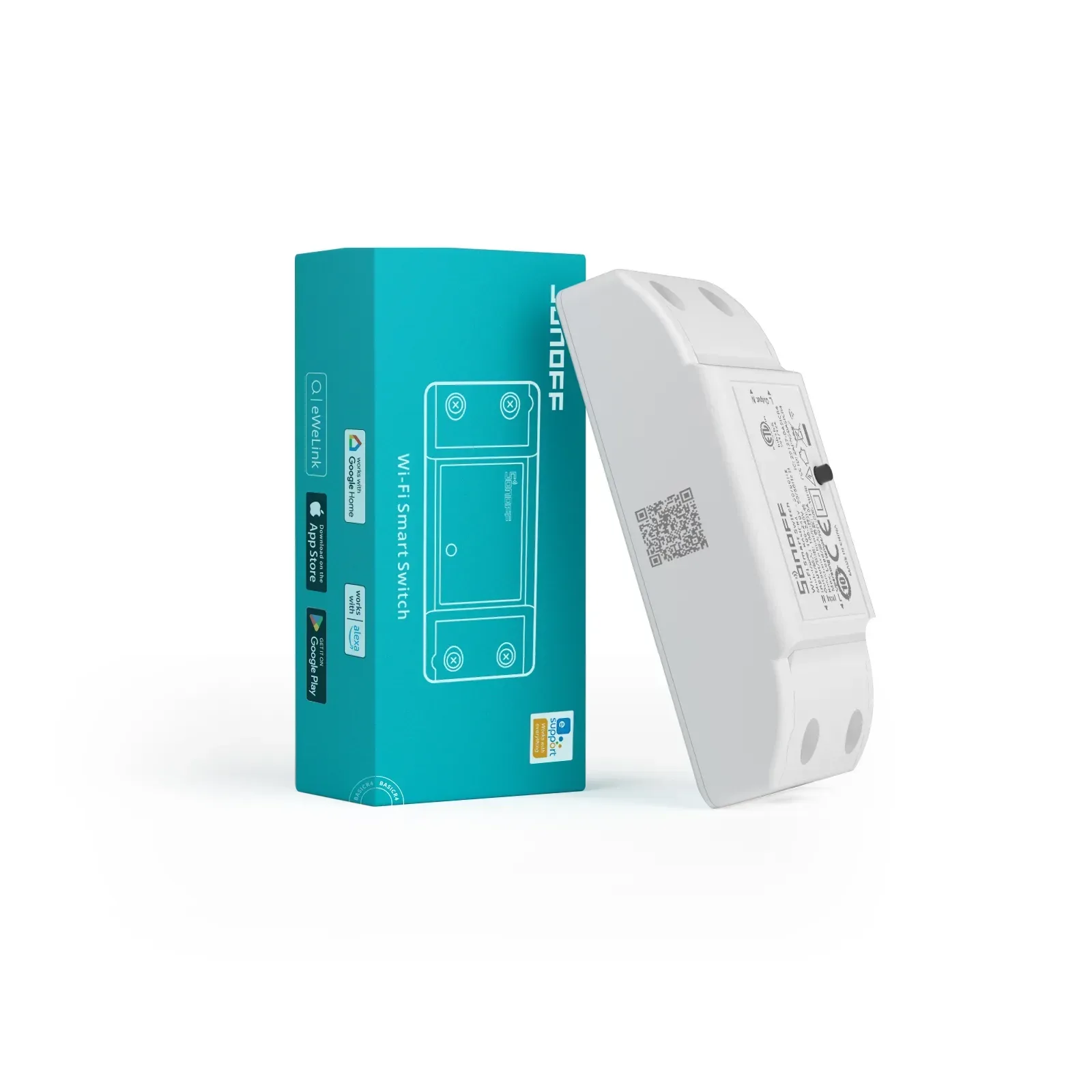
Sonoff SO-BASICR4 Smart Wi-Fi Switch
Pricing is shown to logged-in customers.
Description
Step into the future of home automation with the Sonoff Basic R4, the newly upgraded version of Sonoff's flagship DIY smart switch. This powerful compact relay enhances its core functions and boosts performance while keeping smart home automation budget-friendly. Whether you want to control your lighting seamlessly through a traditional wall switch or a smartphone app, the Sonoff Basic R4 delivers unparalleled reliability, group control, and advanced safety features.
Key Features & Benefits
· eWeLink-Remote Gateway Functionality: Works as a smart gateway, allowing you to integrate sub-devices and pair them with the Sonoff S-Mate2 or R5 controllers for local and two-way control scenes.
· Convenient Group Control: Effortlessly group multiple devices together to manage your entire smart home ecosystem with a single tap.
· Safety-First Design: Features built-in auxiliary overheating protection and an internal temperature sensor to prevent deformation or melting of live components.
· Fully Certified & Approved: Rest easy knowing the Basic R4 holds CE, FCC, ETL, ICASA, and NRCS certifications (NRCS Registration: RCC #208618/001) for strict safety compliance in South Africa.
- Input / Output
- 100-240V AC 50/60Hz
- Max Power / Load
- 2400W @ 240V (10A Max)
- Wi-Fi Frequency
- IEEE 802.11 b/g/n 2.4GHz
- Enclosure Material
- Fire-retardant PC V0
- Dimensions & Weight
- 88 x 39 x 24 mm | 45.8g
- Working Temperature
- -10°C to 40°C
-
Does the Sonoff Basic R4 support voice control? +
Yes. The Sonoff Basic R4 integrates seamlessly with the eWeLink app, making it fully compatible with Amazon Alexa and Google Assistant for hands-free voice control.
-
What is Magic Mode on the Sonoff Basic R4? +
Magic Mode allows you to control the smart relay using a normal physical wall switch without disconnecting the smart switch from power, ensuring it always stays online in your app.
-
Is the Sonoff Basic R4 safe to use with South African backup power systems? +
Yes, it is ICASA and NRCS approved. However, if you are using Magic Mode on an inverter system, sudden voltage changes during source switching (e.g., switching from grid to solar) might trigger the relay state.
No reviews yet. If you have used this one on a site, tell us how it went.
Details +
Description
Step into the future of home automation with the Sonoff Basic R4, the newly upgraded version of Sonoff's flagship DIY smart switch. This powerful compact relay enhances its core functions and boosts performance while keeping smart home automation budget-friendly. Whether you want to control your lighting seamlessly through a traditional wall switch or a smartphone app, the Sonoff Basic R4 delivers unparalleled reliability, group control, and advanced safety features.
Key Features & Benefits
· eWeLink-Remote Gateway Functionality: Works as a smart gateway, allowing you to integrate sub-devices and pair them with the Sonoff S-Mate2 or R5 controllers for local and two-way control scenes.
· Convenient Group Control: Effortlessly group multiple devices together to manage your entire smart home ecosystem with a single tap.
· Safety-First Design: Features built-in auxiliary overheating protection and an internal temperature sensor to prevent deformation or melting of live components.
· Fully Certified & Approved: Rest easy knowing the Basic R4 holds CE, FCC, ETL, ICASA, and NRCS certifications (NRCS Registration: RCC #208618/001) for strict safety compliance in South Africa.
Specifications +
- Input / Output
- 100-240V AC 50/60Hz
- Max Power / Load
- 2400W @ 240V (10A Max)
- Wi-Fi Frequency
- IEEE 802.11 b/g/n 2.4GHz
- Enclosure Material
- Fire-retardant PC V0
- Dimensions & Weight
- 88 x 39 x 24 mm | 45.8g
- Working Temperature
- -10°C to 40°C
Questions +
-
Does the Sonoff Basic R4 support voice control? +
Yes. The Sonoff Basic R4 integrates seamlessly with the eWeLink app, making it fully compatible with Amazon Alexa and Google Assistant for hands-free voice control.
-
What is Magic Mode on the Sonoff Basic R4? +
Magic Mode allows you to control the smart relay using a normal physical wall switch without disconnecting the smart switch from power, ensuring it always stays online in your app.
-
Is the Sonoff Basic R4 safe to use with South African backup power systems? +
Yes, it is ICASA and NRCS approved. However, if you are using Magic Mode on an inverter system, sudden voltage changes during source switching (e.g., switching from grid to solar) might trigger the relay state.
Reviews +
No reviews yet. If you have used this one on a site, tell us how it went.
Important Installation & Usage Notes
· Internet Requirement: To maintain your warranty, this smart switch must remain connected to the internet.
· Inverter & Magic Mode Compatibility: If you choose to configure "Magic Mode" to toggle your lights, please note that sudden inverter voltage drops (during transitions between Utility, Solar, or Battery power) may inadvertently trigger the switch state.
How to Pair the Sonoff Basic R4 with the Sonoff S-Mate2
The Sonoff Basic R4 features built-in "eWeLink-Remote" gateway functionality, which allows you to use it as a local hub. By pairing it with the Sonoff S-Mate2, you can achieve local, wireless two-way control over your lights and appliances even when your home internet is temporarily down.
Follow these simple steps to link your devices:
1. Ensure Devices are Online: Make sure your Sonoff Basic R4 is successfully paired to your eWeLink app and connected to your 2.4GHz Wi-Fi network.
2. Access Device Settings: Open the eWeLink app, find your Basic R4 on the dashboard, and tap on it to open its control interface.
3. Enable eWeLink-Remote: Tap the three dots ... in the top right corner to access Device Settings, then look for and select "eWeLink-Remote sub-devices".
4. Trigger Pairing Mode: Tap "Add" or "Add Sub-device" within the app interface. The Basic R4 is now actively listening for an external remote signal.
5. Send a Signal from S-Mate2: Physically press or toggle any of the connected switches wired into your S-Mate2 module. This sends out a localized RF/Bluetooth-based command.
Confirm and Save: The app will detect the signal and display the S-Mate2 on your screen. Give your new sub-device a recognizable name (e.g., "Hallway S-Mate2"), save the configuration, and assign your desired smart scenes.