
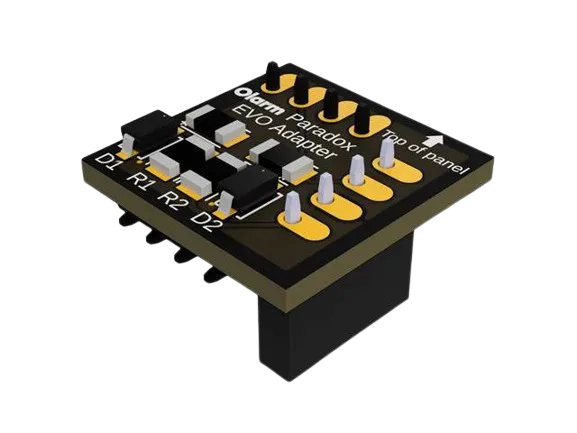
Description
The Olarm PRO – Paradox EVO192 Adaptor is a small but essential interface board that allows your Olarm PRO communicator to connect seamlessly to a Paradox EVO192 alarm panel. Without this adaptor, newer EVO192 panels (especially firmware versions 7.7 and above) may not communicate with the Olarm system, limiting the smart features you can enjoy.
Once connected, your Paradox alarm can send real-time status updates, remote arm/disarm commands, and alerts via the Olarm App — all without replacing your existing alarm hardware.
Key Features
-
Panel compatibility: Designed specifically for Paradox EVO192 alarm systems.
-
Simple plug-in installation: Connects to the alarm panel’s serial port.
-
Enables smart integration: Required for integrating Paradox EVO192 with Olarm PRO communication.
-
Compact design: Small form factor for easy installation inside alarm enclosures.
-
No separate power needed: Draws power from the alarm panel interface.
Benefits You’ll Love
Seamless Olarm PRO Integration
This adapter board makes it possible for the Olarm PRO communicator to interface with the Paradox EVO192 panel. Therefore, you gain full connectivity to the Olarm App and cloud services for remote control and monitoring.
Smart Alarm Features Unlocked
Once installed, remote arming, disarming, notifications, and status updates become available right on your phone — ideal for homeowners and installers who want modern alarm control without panel replacement.
Quick & Cost-Effective Upgrade
Rather than upgrading your entire alarm system to a new panel, this adaptor board lets you extend the life and connectivity of your existing Paradox EVO192 setup. Because it’s plug-and-play, installation is quick and doesn’t require complex wiring.
Use Cases
Remote arm/disarm from the Olarm App
Receive alarm zone notifications and events
Integrate EVO192 panels with dual-network communication (GSM/Wi-Fi) via Olarm PRO
Upgrade legacy alarm systems without full replacement
How It Works
-
Install the Olarm PRO communicator inside or near the alarm panel.
-
Plug the adaptor board into the serial port of the Paradox EVO192 panel.
-
Connect the Olarm PRO communicator to your mobile network or Wi-Fi.
-
Install and configure through the Olarm App to enable remote control and notifications.
This adapter is essential for EVO192 panels manufactured after March 2023, as these units may have locked serial ports without the board.
📘 For official Olarm installation information, see:
👉 Olarm installation guides (general): https://www.olarm.com/install-guides/
Learn More
For more details on Olarm products and setup:
👉 Olarm Products & Guides — https://www.olarm.com/products/olarm-link
👉 Olarm Install Guides — https://www.olarm.com/install-guides/
What’s in the Box
-
1x Olarm PRO Paradox EVO192 Adaptor Board
-
Mounting/connector hardware (varies by supplier)
Quick Tip for South African Customers
Keep this adaptor on hand when integrating Paradox EVO192 alarm panels with Olarm systems — especially for modern panels that don’t allow third-party communications without the board. It’s a small investment that unlocks powerful smart features and remote alarm management.


Reviews
There are no reviews yet.